


CLI and MCP tools
Run direct tool calls against every connected system from your terminal. 320+ tools, available the moment you install.
MCP tools reference →Few know where to start. DMTools is the orchestration layer between the systems you already run and the agents your teams already use — one CLI, every integration, nothing to deploy.
See how DMTools turns delivery signals into an autonomous agent workflow.
The problem
Copilots sit in every team and a model sits in every IDE. But the work between them still moves by hand: someone copies a ticket into a prompt, someone pastes the answer into a branch, and the glue is a folder of scripts nobody owns. The tools never learned to talk to each other.
Disconnected tools. Broken handoffs.
One-off scripts don't scale. What scales is an orchestration layer that speaks every system's language.
The answer
Between your AI agents and your enterprise systems — one CLI, every integration they need.
One CLI for the whole toolchain.
AI providers
Anthropic Claude · OpenAI · Google Gemini · AWS Bedrock · GitHub Copilot · Ollama · Vertex AI · DIAL
Delivery and collaboration
Jira · Azure DevOps · GitHub · GitLab · Confluence · Figma · Microsoft Teams · TestRail · Bitrise · Jenkins · SharePoint · Bitbucket
Plus Vertex AI, DIAL, Bitrise, Jenkins, SharePoint and Bitbucket — 20+ integrations in all.
Adoption paths, each valuable on its own
Servers to run or agents to babysit
By the numbers
Not a roadmap — what ships today. Every tool is generated from annotated Java at compile time, documented in the repository, and callable the moment you install.
0+
CLI tools spanning trackers, repositories, wikis, design systems and AI providers
0+
System integrations, each with setup guides and a tool reference
17+
Java baseline — runs anywhere your CI already runs
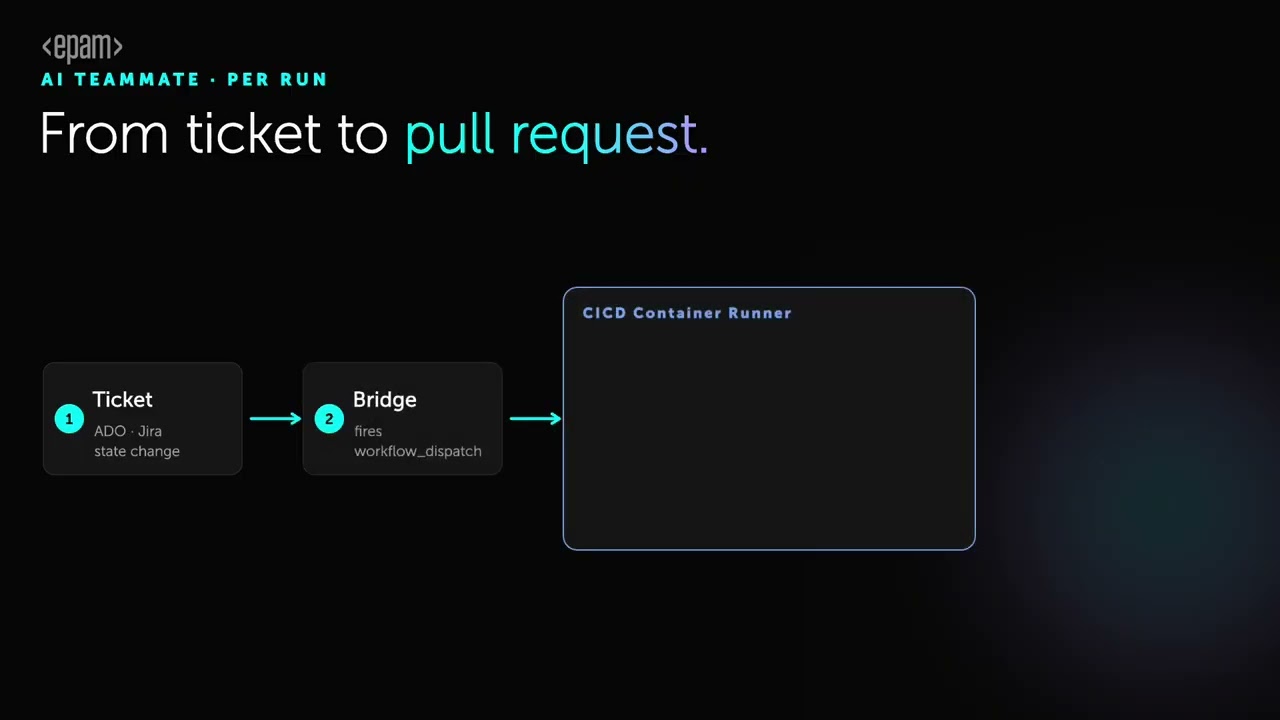
AI teammate · per run
Clean runner. Fresh tools. Full context. The model reasons, and a pull request waits for a human. Nothing to deploy, nothing to babysit.
Ticket
Jira or Azure DevOps fires a service hook on update.
Bridge
A small function triggers workflow_dispatch.
CI/CD container runner
DMTools CLI
Installed fresh for this run — nothing to deploy.
Context
A pre-action pulls the ticket, wiki, repository and knowledge base.
Reasoning
Your chosen provider works with the full picture, not a snippet.
Publish
A post-action opens a branch and a pull request.
Pull Request
Code and documentation, waiting for review.
Zero persistent infrastructure.DMTools installs fresh on every run. There is no server to maintain and no agent process to keep alive — just repeatable, auditable automation that leaves a trail your auditors can read.
Agent pipeline
A story does not move through one generic prompt. It passes through focused agent configurations that clarify requirements, prepare solution context, implement code, review the pull request, handle rework, generate tests, and close the tracking loop only after the delivery signals line up.
Developer experience
Read the ticket. Pull the page. Ask the model. Ship the result. Every one of the 320+ tools is a function your engineers can already call — no SDK to learn, no schema to hand-write.
// 1 — read context from every connected system
const ticket   = await jira_get_ticket('PROJ-123');
const guidelines = await confluence_content_by_title('API Design Guidelines');
const openPRs  = await github_list_prs({ state: 'open' });

// 2 — build the context and ask the model
await file_write('context.md', buildContext(ticket, guidelines, openPRs));
const result = await gemini_ai_chat({
  prompt:  `Implement the story: ${ticket.summary}`,
  context: file_read('context.md')
});

// 3 — ship it: branch and pull request, waiting for review
await github_create_branch('feature/PROJ-123');
await github_create_pull_request({
  title:  ticket.summary,
  body:   result.explanation,
  branch: 'feature/PROJ-123'
});
Adoption
Start from the terminal today and stop there if that's enough. Each path stands on its own, and each one is a step you can take without a platform migration.
Run direct tool calls against every connected system from your terminal. 320+ tools, available the moment you install.
MCP tools reference →Orchestrate real workflows — AI teammate, reporting, test generation, story development — in plain JavaScript.
Jobs reference →Run DMTools in GitHub Actions, GitLab CI, Jenkins or Bitrise for ticket processing and teammate flows at scale.
GitHub Actions guide →Install project-level DMTools skills for Cursor, Claude, Codex and Copilot. The agents your teams already use gain full delivery reach.
Skill guide →Install
No account, no licence key, no server. Pick your platform and paste.
curl -fsSL https://github.com/epam/dm.ai/releases/latest/download/install.sh | bashInstalls the CLI to ~/.dmtools. Requires Java 17 or newer.
irm https://github.com/epam/dm.ai/releases/latest/download/install.ps1 | iexRun in PowerShell 5.1 or newer. Requires Java 17 or newer.
curl -fsSL https://github.com/epam/dm.ai/releases/latest/download/skill-install.sh | bashAdds the DMTools skill to your project for Cursor, Claude Code and Codex.
Then check it landed
dmtools listPrints every tool the CLI can reach. Nothing listed means the integrations still need credentials —configuration guide →
Common questions
What teams ask on the first call — where the data goes, who has to run it, and what happens when the model gets something wrong.
DMTools is an open-source command-line orchestrator that puts AI agents to work inside enterprise delivery systems. One CLI carries 320+ tools across 20+ integrations — Jira, Azure DevOps, GitHub, GitLab, Confluence, Figma, Microsoft Teams and every major AI provider. EPAM Systems builds and maintains DMTools, and ships it under the Apache 2.0 licence.
DMTools sends nothing to EPAM and talks to no hosted service of its own. The CLI runs inside your own CI pipeline or on your own machine, under your credentials, against the AI provider you picked. Nothing sits in the middle, and there is no telemetry path home.
DMTools needs one technical teammate, once. That person installs and configures it per project — Java 17 or newer plus a set of environment variables. From then on delivery managers, QA and platform teams meet the output rather than the tool: processed tickets, drafted pull requests, generated reports.
DMTools merges nothing on its own. Every branch and pull request it opens waits for human review before it ships — the model drafts the work, your engineers approve it. And because each run installs fresh and leaves its trail in CI, a wrong answer is something you can audit rather than puzzle over.
DMTools reaches more than twenty systems, and GitHub is only one of them. The list runs Jira, Azure DevOps, GitHub, GitLab, Bitbucket, Confluence, SharePoint, Figma, Microsoft Teams, TestRail, Jenkins and Bitrise. None of them is a prerequisite for the rest.
DMTools locks you into none of them. It speaks to Anthropic Claude, OpenAI, Google Gemini, Google Vertex AI, AWS Bedrock, the EPAM DIAL enterprise gateway, and fully local models through Ollama for when code and tickets must never leave your network. The choice is an environment variable read at runtime, so switching costs no code change.
DMTools has no paid tier. The software is Apache 2.0 — no account, no licence key, nothing to buy. Your only bills are the AI provider you chose and the delivery tools your organisation already pays for.
DMTools covers in one install what would otherwise be twenty-odd separate MCP servers, since a typical one wraps a single system. It then exposes all of that four ways — direct CLI calls, MCP for assistants such as Claude and Cursor, plain JavaScript functions inside jobs, and CI pipelines. Every tool is generated from annotated Java at compile time, so the CLI surface, the MCP schema and the JavaScript functions cannot drift apart.
Get started
Open source under Apache 2.0, built and maintained by EPAM engineers who run it on their own delivery.